


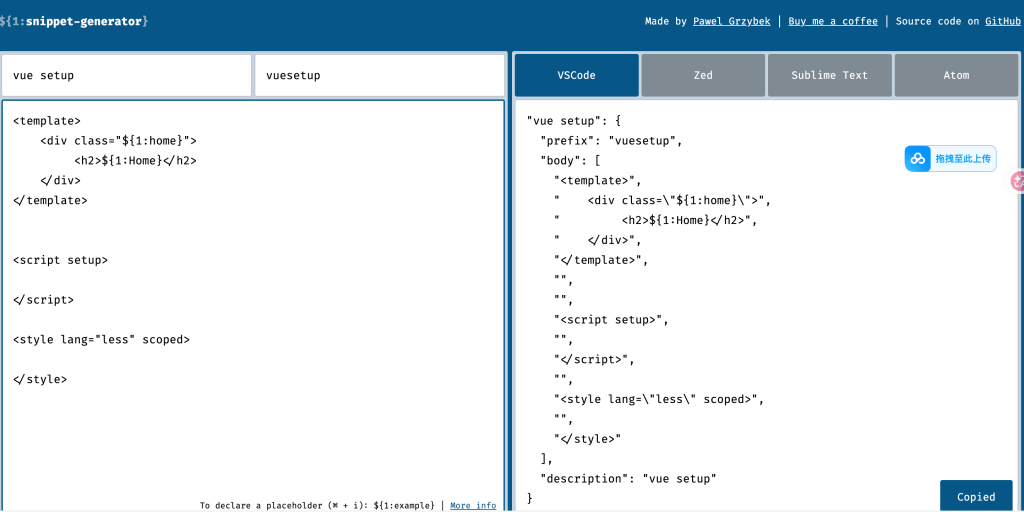
https://snippet-generator.app/?description=&tabtrigger=&snippet=&mode=vscode
例如:
<template>
    <div class="${1:home}">
         <h2>${1:Home}</h2>
    </div>
</template>


<script setup>

</script>

<style lang="less" scoped>

</style>
vscode设置如下:
设置->snippets->搜索vue
得到之后并修改:
{
	// Place your snippets for vue here. Each snippet is defined under a snippet name and has a prefix, body and
	// description. The prefix is what is used to trigger the snippet and the body will be expanded and inserted. Possible variables are:
	// $1, $2 for tab stops, $0 for the final cursor position, and ${1:label}, ${2:another} for placeholders. Placeholders with the
	// same ids are connected.
	// Example:
	// "Print to console": {
	// 	"prefix": "log",
	// 	"body": [
	// 		"console.log('$1');",
	// 		"$2"
	// 	],
	// 	"description": "Log output to console"
	// }
	//
	// You can also restrict snippets to specific files using include/exclude patterns:
	// "Test snippet": {
	// 	"prefix": "test",
	// 	"body": "test('$1', () => {\n\t$0\n});",
	// 	"include": ["**/*.test.ts", "*.spec.ts"],
	// 	"exclude": ["**/temp/*.ts"],
	// 	"description": "Insert test block"
	// }

	"vue setup": {
		"prefix": "vuesetup",
		"body": [
			"<template>",
			"    <div class=\"${1:home}\">",
			"         <h2>${1:Home}</h2>",
			"    </div>",
			"</template>",
			"",
			"",
			"<script setup>",
			"",
			"</script>",
			"",
			"<style lang=\"less\" scoped>",
			"",
			"</style>"
		],
		"description": "vue setup"
		}
}
如此在vue的文件里面打出vue。。就会可以直接用这个代码片段,极大提高效率
软件/资源下载方式:
滑动到上方购买后即可下载,如果链接失效,请添加站长微信(laifeizhouma),软件/资源/教程/源码均为站长耗费精力收集而来,整理不易,赚个热干面钱希望理解 如果有长期需求,建议充值钻石VIP或者永久VIP,大部分资源对VIP都是免费的© 版权声明
文章版权归作者所有,未经允许请勿转载。
THE END







暂无评论内容